Simpleware ScanIP

Providing a broad range of image visualisation, processing and segmentation tools, suitable for everyone from the casual to the expert user.

Segmented images can be exported as STL or IGES files for CAD analysis or RP manufacturing, and with the +FE module, imported directly into leading commercial finite element packages. ScanIP offers an extensive selection of image processing tools to assist the user in visualising and segmenting regions of interest from any volumetric 3D data (e.g. MRI, CT, microCT, microscopy…).

New in Version 4


Improved usability and workflow
  • Paint with threshold and smooth paint brush option
  • 3D stereo mode and full screen option
  • High resolution screenshot export
Internal structures for rapid prototyping
  • Seamlessly add complex lattice structures to segmented image data
  • Save material costs whilst maintaining mechanical requirements
  • Additional option to automatically mesh internal structures for FEA

Benefits

  • Intuitive user interface
    Easy to use
  • Generate high quality, multi-part STL and surface models
    No need for manual fixing or remeshing
  • Direct image to surface conversion for surface export and visualisation
    Accurate, high quality representations of your data

Key features

  • Imports a wide range of file formats
  • Customisable workspace with multiple 2D/3D viewing modes
  • Direct export to CAD for meshing in other packages
  • Powerful, semi-automated segmentation tools
  • Volume and topology preserving smoothing
  • Robust multi-part surface mesh/STL generation

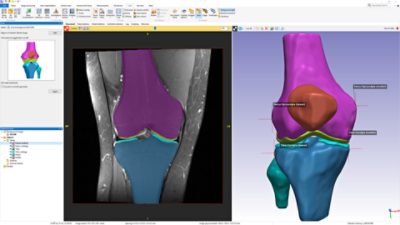
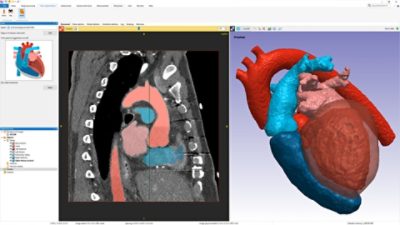
Screenshots

ScanIP Technical Data

ScanIP offers an intuitive and interactive environment to assist the user in segmenting 3D data into masks, ready for surface and/or volume meshing.

►expand all   ►hide all

Import formats

  • DICOM (version 3.0 and 2D stacks)
  • ACR-NEMA (versions 1 and 2)
  • Interfile
  • Analyze
  • Meta-Image
  • 2D Image Stacks:
    • BMP
    • GIF
    • JPEG
    • PCX
    • PNG
    • PNM
    • TIFF
    • XPM
  • Raw Image Data

Export formats

  • Segmented image
    • RAW image
  • Surface model
    • STL
    • IGES
    • ACIS (SAT)
    • ANSYS Surface
    • ABAQUS Surface
    • OPEN INVENTOR
    • POINT CLOUD
  • 3D screenshot
    • JPEG
    • PNG
    • VRML
    • Postscript (*.eps)
    • BMP
    • PNM
    • PDF

General User Interface

  • User defined interface: dockable tool boxes, range of 2D/3D view options
  • Undo/Redo operation support
  • Independent part visibility control in 2D and 3D
  • Ability to import multiple image sets into the workspace to aid segmentation
  • Histogram and Profile Line utilities assist in finding optimal threshold values
  • Automatic logging and timestamp of filters and tools applied since the creation of a project

2D User Interface

  • 3x 2D views
  • Ability to work on single slice, selection of slices or whole volume
  • Markers to identify the position of 2D slices
  • Mask transparency

3D User Interface

  • Interactive cropping using 3D view
  • Clipping box—unconstrained, interactive sectioning of 3D rendering
  • Fast 3D preview mode for rapid visualisation of segmentation
  • Mask transparency
  • 3D stereoscopic visualisation with selected hardware
  • Wireframe mode
  • Vertex lines superimposed over surfaces mode
  • Lighting and 3D rendering adjustments
  • Background gradient adjustments

Measurement tools

  • 3D distances
  • 2D distances
  • Centre of mass
  • Profile line
  • Histogram
  • Number of pixels
  • Volumes
  • Face area
  • Mean greyscale
  • Standard deviation greyscale
  • Region centre
  • Moment of inertia

Image Processing Tools

  • Data Processing
    • Crop
    • Pad
    • Rescale
    • Shrinkwrap
    • Resampling/Reslice
    • Flip
    • Shear
    • Align
  • Basic Filters (most commonly used)
    • Smoothing Recursive Gaussian
    • Noise filtering Bi-lateral Gradient Filter
    • Mean Filter
    • Median Filter
    • Binarisation Filter
    • Cavity Fill
    • Island Removal Rilter
  • Advanced Filters (more specialist applications)
    • Gradient Magnitude Filter
    • Anisotropic Diffusion
    • Curvature Anisotropic Diffusion
    • Curvature Flow
    • Discrete Gaussian Filter
    • Min/Max Curvature Flow
    • Skeletonisation
    • Metal Artefact Reduction
  • Morphological Filters (can be applied to both images and masks)
    • Erode
    • Dilate
    • Open
    • Close
  • Level Set Methods—allow segmentation based on implicit surfaces. Contour specific features can therefore be controlled  during the region growing/surface adjusting process.
  • Lattice Factory—allows masks to be filled with a user defined internal structure.
  • Segmentation Tools
    • Paint/Unpaint
    • Paint with Threshold
    • Confidence Connect Region Growing
    • Floodfill
    • Thresholding
    • Automated generation of masks for pre-segmented images
  • Boolean Operations—applied to/between masks
    • Union
    • Intersect
    • Subtract
    • Invert
  • Overlap Check—display/generate mask to check overlap volume in active masks.
  • Topology and volume preserving smoothing
  • Agressive smoothing
  • Decimation
  • Multipart surface creation
  • Surface element quality control (for volume meshing in third party software)
  • So-called ‘sub-pixel accuracy’ through the use of partial volume effects data

Other

  • Seamless integration with Simpleware's +CAD module for interactive CAD/STL object integration and positioning.
  • Seamless integreation with Simpleware's +FE module for direct volume element generation suitable for FE and CFD simulations.


Download Technical Datasheet